How to Extract All Links from a PDF to a Spreadsheet, and Make Plain-Text URLs Clickable
Upload the PDF to the PDFCourt Link Manager and click Export CSV to get every link as a spreadsheet row. Then open the Not clickable tab to turn web addresses and email addresses that are only printed on the page into real, clickable links.
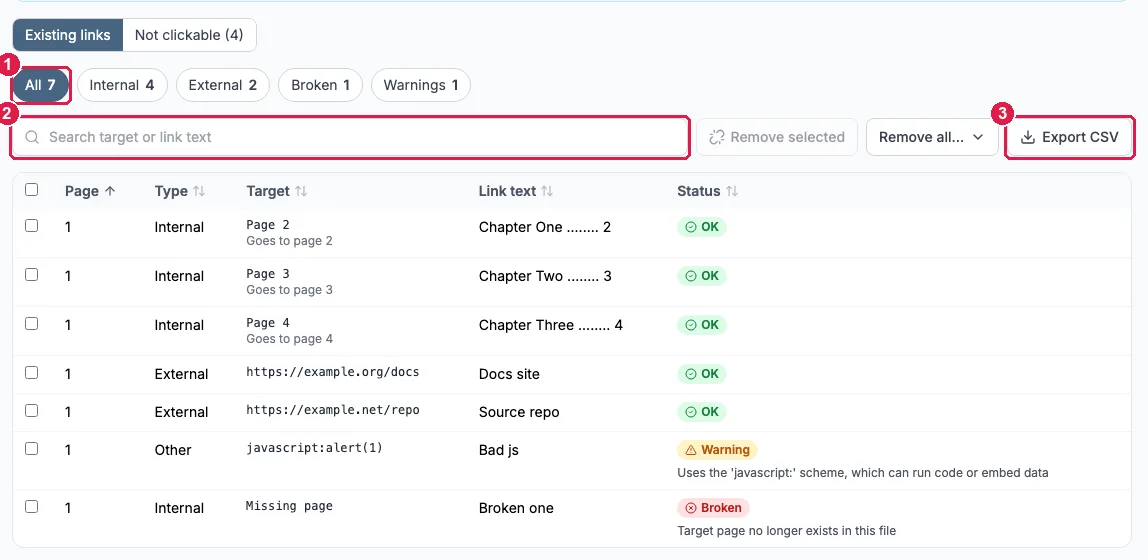
Part 1: Extract the links to a spreadsheet
Scan the PDF
Open the Link Manager and upload your file. You do not need an account. The scan runs by itself and fills a table with one row per link.
Filter the list (optional)
Use the All, Internal, External, Broken and Warnings chips, or type in the search box to match a target or the link text. If you only want outside web links, click External first.
Click Export CSV
The button sits above the table. It saves a CSV with six columns, built in your browser from the scan results:
| Column | What it holds |
|---|---|
| page | The page the link sits on |
| type | internal, external, email, file or other |
| target | The page or address the link goes to |
| anchor_text | The text the link is attached to |
| status | ok, warning or broken |
| issues | The reason, when the status is not ok |
Open it in Excel or Google Sheets
Double-click the file, or import it into Google Sheets. From there you can sort by page, filter by type, or hand the list to a colleague. To check whether outside addresses still load, see our guide to finding and fixing broken links in a PDF.
Part 2: Make printed URLs and emails clickable
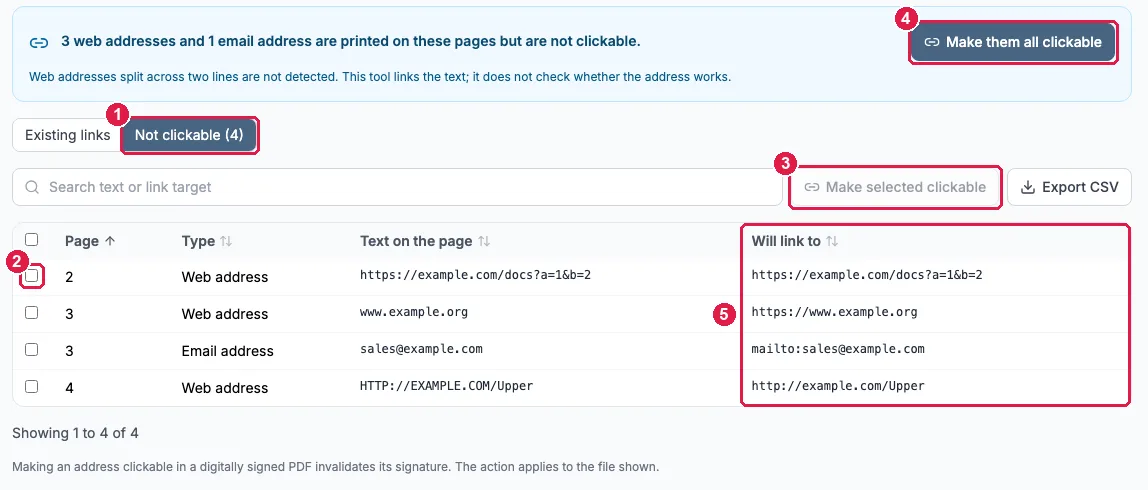
Many PDFs show a web address or an email address as plain text that nothing happens when you click. The Link Manager finds those and shows a blue banner above the table, for example: 3 web addresses and 1 email address are printed on these pages but are not clickable.
Open the Not clickable tab
Click Not clickable, or the Review them first button in the banner. The list shows the page, the type, the text on the page and the address it will link to.
Check the Will link to column
This is exactly what the new link will open. For example, www.example.org will link to https://www.example.org.
Choose which ones
Tick individual rows and click Make selected clickable, or click Make them all clickable. The tab has its own Export CSV button and a search box if you want to review the list in a spreadsheet first.
Confirm and download
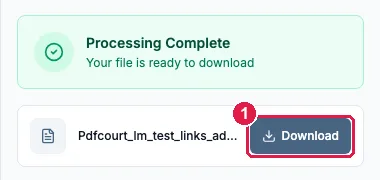
A summary box asks you to confirm. It makes a new copy with the links added, the text on the page does not change, and your original file is untouched until you download the copy. Then click Download in the side panel.

We checked the result on our test file: the downloaded PDF had working links on pages 2, 3 (two of them) and 4, matching the four rows above.
What our test file produced
| Page | Type | Text on the page | Will link to |
|---|---|---|---|
| 2 | Web address | https://example.com/docs?a=1&b=2 | https://example.com/docs?a=1&b=2 |
| 3 | Web address | www.example.org | https://www.example.org |
| 3 | Email address | sales@example.com | mailto:sales@example.com |
| 4 | Web address | HTTP://EXAMPLE.COM/Upper | http://example.com/Upper |
Limits to know about
- Web addresses split across two lines are not detected.
- Only http, https and mailto links are created. A www. address becomes https, an email address becomes mailto.
- The tool links the text. It does not check whether the address works, and it never visits external websites.
- In our test file a version number (1.2.3) and a file name (report.pdf) were not treated as addresses.
- Making an address clickable in a digitally signed PDF invalidates its signature.
Editing a link that already exists
People often search for how to edit links in a PDF. The Link Manager lists and removes links; it does not change where one points. To replace a link, remove it (see how to remove hyperlinks from a PDF), then add a new one with the Jump Links tool, which lets you draw a box on the page and choose a destination page or web address. It is also the answer for an address the detector missed, such as one split over two lines.
Frequently Asked Questions
How do I extract all the links from a PDF?
Upload the PDF to the Link Manager, then use Export CSV. The file lists each link's page number, type (internal, external, email, file or other), target, the text it is attached to, its status, and any issues found. It is built in your browser from the scan results and opens in Excel or Google Sheets.
Does the export include web addresses that are only printed as text?
The main Export CSV on the Existing links tab covers links that are already clickable. Printed addresses that are not links appear on the Not clickable tab, which has its own Export CSV button with the columns page, type, text and will_link_to.
How do I make a URL clickable in a PDF?
Open the Not clickable tab in the Link Manager. It lists web addresses and email addresses printed on the pages. Tick the ones you want and click Make selected clickable, or click Make them all clickable, then confirm and download the new PDF.
Which kinds of links does it create?
Only http, https and mailto links. A printed address that starts with www. becomes an https link, and an email address becomes a mailto link.
Why was a web address in my PDF not detected?
Web addresses split across two lines are not detected. Version numbers and file names such as report.pdf were also not treated as addresses in our test file. For anything it misses, draw the link yourself with the Jump Links tool.
Does it check that the new links work?
No. It links the text but does not check whether the address works, and it never visits external websites.
Can I edit an existing link in a PDF?
The Link Manager lists and removes links; it does not change where a link points. To replace one, remove it here, then add a new link with the Jump Links tool, which lets you draw a box on the page and choose the destination page or web address.
Related Guides
How to Remove Hyperlinks from a PDF →
Remove one link, groups of links, or every link
How to Find and Fix Broken Links in a PDF →
What the link checker can and cannot verify
How to Create PDF Jump Links →
Draw your own links to pages or web addresses
Make a PDF Interactive →
Turn a static PDF into a navigable one