How to Remove Metadata from a PDF Free (2026 Guide)
Every PDF carries hidden fields most people never see — the real author's name, the software that created it, sometimes GPS coordinates from an embedded photo. Here's how to find and strip all of it before you share a file, for free.
Why PDF metadata is a real privacy risk
Open a PDF's "Document Properties" and you'll often find the real name of whoever created it (not the name on the cover page), the exact software and version used, and sometimes a company name baked in from years ago. If a photo is embedded in the PDF, it can carry GPS coordinates from wherever it was taken. None of this is visible when you just read the document — it travels silently with the file.
This matters most right before you send a document externally: a resume, a legal filing, a press release, or anything meant to look anonymous or professionally finalized. A leftover "Jane Smith laptop" creator field or a home GPS tag is an easy, avoidable leak.
Method 1: PDFCourt (100% Free Online)
RECOMMENDED✓ Best for: any PDF you're about to send outside your organization
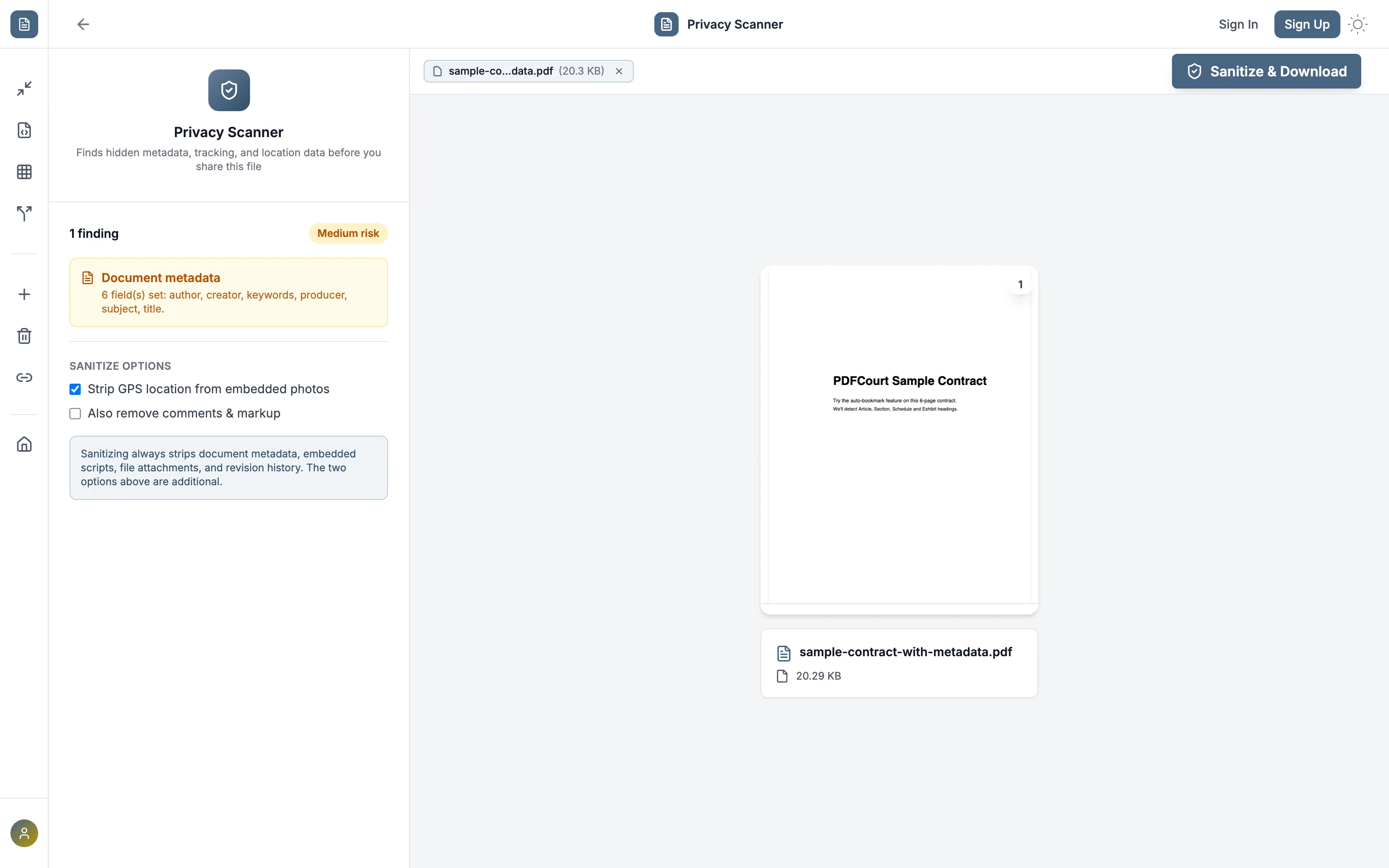
Why it's #1: it doesn't just strip metadata blindly — it scans first and shows you exactly what it found, so you know what was actually in your file.
Step-by-Step Instructions:
Open PDFCourt and upload your PDF
Visit PDFCourt.com/privacy-scanner. The scan starts the moment your file loads — no button to click.
Review what it found
Each finding is labeled by risk level and tells you exactly which fields are set — in the example above, six metadata fields including author and creator.
Turn on the extras you need
"Strip GPS location from embedded photos" and "Also remove comments & markup" are optional add-ons — metadata, embedded scripts, file attachments, and revision history are always stripped regardless.
Click Sanitize & Download
You get a clean copy with the visible content untouched and everything else stripped.
Method 2: Adobe Acrobat DC (Paid Software)
Cost: $19.99/month or ~$240/year
Best for: organizations already paying for Acrobat's "Sanitize Document" tool.
Steps:
- Open Adobe Acrobat DC (not the free Reader)
- Go to Tools → Redact → Sanitize Document
- Confirm removing hidden information
- Save the sanitized copy
Note: Acrobat sanitizes in one irreversible step with no preview of what it's about to remove — you don't see the findings first the way PDFCourt shows them.
What actually gets checked
Document metadata
Author, title, subject, keywords, creator, and producer fields — often left over from whoever drafted the file.
Embedded scripts & auto-run actions
JavaScript and open-actions that can fire automatically when the PDF is opened.
File attachments & comments
Anything attached to or annotated on the document that isn't part of the visible page content.
Revision history & GPS data
Incremental-save history that can reveal earlier drafts, plus GPS EXIF data in any embedded photo.
Comparison: Which Method Should You Use?
| Method | Cost | Shows Findings First | Checks GPS in Photos | Works On |
|---|---|---|---|---|
| PDFCourt | Free | Yes | Yes | All devices |
| Adobe Acrobat | $20/mo | No | Not specifically | Win/Mac |
🏆 Winner: PDFCourt
The only free option that shows you exactly what it found before removing it — not a blind one-click sanitize.
Frequently Asked Questions
Does removing metadata change how the PDF looks?
No — sanitizing only removes hidden data (metadata, scripts, attachments, revision history). The visible page content is untouched.
Will it find GPS data in a scanned photo pasted into the PDF?
Yes, if you enable "Strip GPS location from embedded photos" — it checks EXIF data in any embedded image, not just the PDF's own metadata fields.
Is a password-protected PDF still scanned correctly?
A PDF that only has an owner password (restrictions, no open password) is scanned normally — a PDF requiring a password to open needs to be unlocked first.
Do I need Adobe to remove PDF metadata?
No — PDFCourt scans and sanitizes directly in your browser, free, with no Adobe Acrobat or other software required.
Conclusion: Best Way to Remove PDF Metadata Free in 2026
See findings first
Know what's in your file before it's stripped.
100% Free Forever
No hidden costs, no trials, no upsells.
More than metadata
Also catches scripts, attachments, and GPS data.
Ready to Check Your PDF?
Scan for hidden data before you share it — free.
Scan a PDF Now — It's Free →